MCP Prompt Templates for Structured Workflows
Master the distinction between tools, resources, and prompts before building your server.
A server built on MCP can offer three kinds of things, and the difference between them comes down to one question: who's driving? Get that question wrong and the server still runs, technically, but it just runs wrong, quietly, until someone has to explain why in a postmortem.
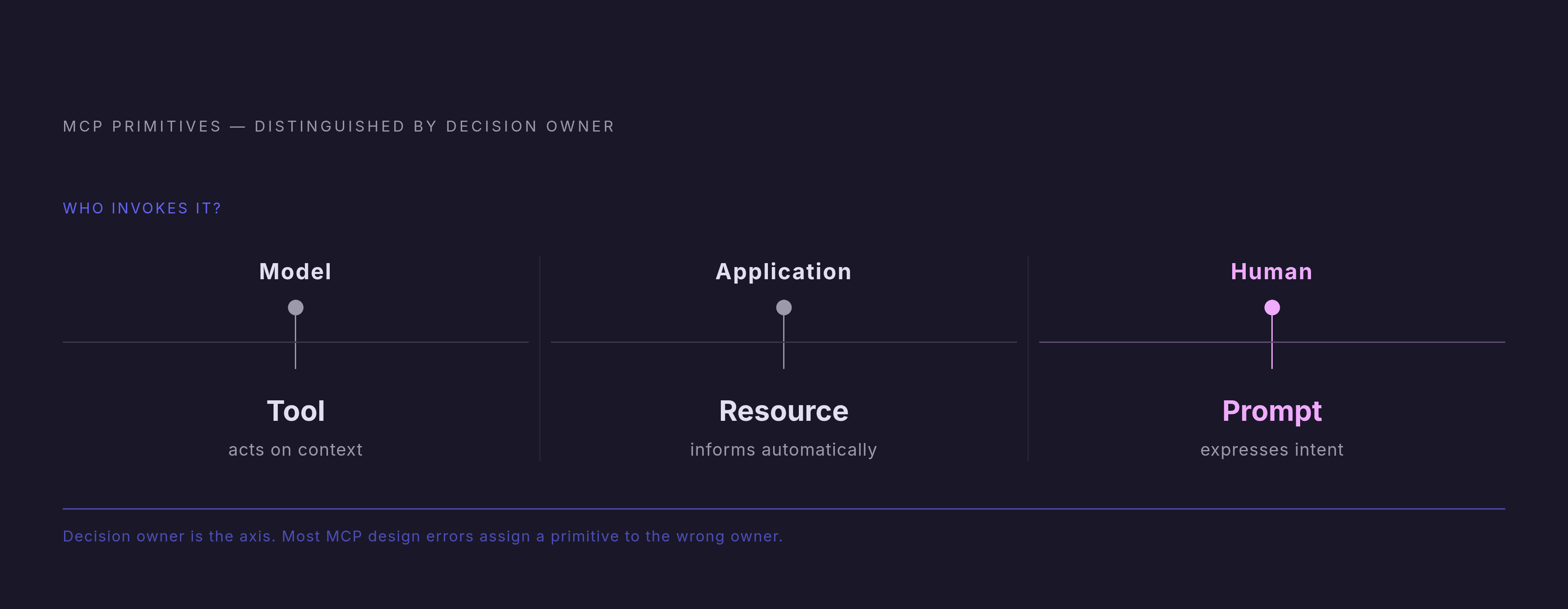
Tools are actions the model calls on its own, mid-conversation, based on what it decides it needs. Resources are read-only data the host application loads in the background, no model judgment involved. Prompts are message templates a person has to actually pick. Three primitives, three different owners of the decision, and confusing the owner is the single most common design mistake in an MCP server, not close.
The question to ask before any code gets written is blunt: who decides when this runs? If the model figures it out from context, that's a Tool. If the application loads it without asking anyone, that's a Resource. If a human has to consciously choose it, that's a Prompt. Tools act, resources inform, prompts express intent.
Here's the position worth stating plainly: most teams default to Tools for everything, and that default is wrong more often than it's right. Tools demo well, so Tools get built, whether or not the workflow actually calls for one. Wire something as a Tool when it should have required a person's sign-off, and it fires without anyone noticing; that turns into an incident report, not a demo highlight. Stuff a dataset into prompt text instead of exposing it as a Resource, and every request hauls that dead weight along with it, bloating context for no reason. The categories don't blur by accident. They blur because Tools are the flashy option and nobody stopped to ask who should be driving.
What an MCP prompt template actually is, technically
Strip away the abstraction and a prompt is a template a server exposes: a fixed list of messages meant to kick off the same behavior, reliably, every time someone runs it.
The mechanics are plain. A server calls prompts/list to announce what's on offer, and each entry carries a name, a description, and a schema for its arguments. When a user picks one, the client sends prompts/get, and the server hands back the filled-in message list, ready to go.
Arguments are where the template flexes. MCP lets a server mark each one required or optional. The spec's own examples make the pattern clear: a git-commit prompt needs a changes argument, while an explain-code prompt needs code but treats language as optional filler. Scale that up, and picture an executive_summary prompt built for internal reporting: doc_id, focus (financial, strategic, operational), and audience as arguments, one template producing a different summary depending on who's asking and why.
The spec, as of version 2025-11-25, supports multi-message prompts explicitly, so one prompt definition can lay out an entire back-and-forth exchange instead of a single canned response. And because the template lives on the server, updating it never touches a line of client code; every client picks up the new version the next time it asks. That's the property separating a demo from something a team can run day after day without babysitting it.
One rule holds the whole thing together: prompts never fire on their own, and the model can't decide to invoke one mid-conversation the way it might reach for a Tool. A person, or the client acting on a person's behalf, has to trigger it directly. That restriction keeps prompts out of the autonomous tool-call loop entirely, and it's also why they're harder to demo quickly.
Why prompts are underused despite being in the spec from the start
Tools are easy to show off: point a model at an API and watch it decide to call the weather endpoint. Prompts require someone to sit down and think through a workflow first, which makes for a duller tutorial, so most early guides skipped it. The ecosystem followed the tutorials, not the spec, and it hasn't fully corrected course since.
Timing made it worse. The protocol's official blog didn't publish a dedicated post on using prompts for automation until mid-2025, months after launch, well after developers had already settled into tools-first habits. By then the mental model was set: MCP means giving the model actions to take, full stop, and nobody went back and reread the part about prompts.
Client support widened the gap instead of narrowing it. Claude Desktop surfaces prompts as slash commands, at least giving users a visible handle on them. Several other popular hosts don't display prompts in their interface at all, and OpenAI's MCP client documentation, as of this writing, doesn't expose them either. A server whose real value sits in a set of carefully built prompt templates is invisible to anyone using it through the wrong client. That's the gap between a feature existing and a feature mattering, and it's a wide one.
The tooling itself doesn't help, and here's where the underuse compounds into something worse than neglect. Most MCP SDKs treat a prompt as a function that returns a list of messages and calls it done. No built-in model for multi-step data flow, no clean abstraction for the hybrid pattern where the server handles the deterministic parts and the model handles judgment. So developers, faced with a thin SDK and a workflow that would fit a Prompt perfectly, reach for a Tool instead, because that's what the SDK makes easy. That instinct deserves pushback: a Tool-shaped version of a workflow that should have been a Prompt is harder to audit, harder to hand to a non-developer, and less consistent every single run, since the model ends up improvising steps that should have been fixed in advance.
How prompt templates turn ad-hoc AI interactions into repeatable workflows
Here's the shift, in plain terms. Without a prompt template, a user types an instruction from scratch each time, phrasing it slightly differently every session, and gets back an answer that varies with the phrasing. A prompt template gives the server a fixed entry point: explicit arguments, a validated structure, and pre-processing that happens before the model ever sees a token.
That pre-processing is the load-bearing part, and it's the part most people underrate. Fetching data, checking that arguments make sense, formatting inputs, calling whatever internal API needs calling: all of that runs on the server, deterministically, before the message list gets built. The model receives a clean, fully-loaded set of messages and handles the part it's actually good at: reasoning, drafting, judgment calls. The server carries no opinions of its own, and the model carries no burden of remembering how to hit an internal API correctly on the fortieth try in a row, since consistency was never the model's job.
For workflows that repeat, this hybrid split beats asking the model to run the whole thing through instructions alone, every time. The determinism on the server side removes the variability that makes purely instruction-driven pipelines wobble as volume climbs.
It composes, too. A single prompt can pull from several servers at once: a plan-offsite prompt taking location, dates, attendees, and budget might read from a calendar server, a conference-booking server, and a travel server in one invocation, with the user picking which sources to include. Building that from scratch in a chat window every time means retyping the same structure, with the phrasing drifting a little more each round until nobody's sure what the "standard" version even was anymore.
The production-grade properties fall out of this naturally. Version the prompt once, and every client gets the update. The user's explicit choice to run it creates a natural audit point: a record of who asked for what, and when. Arguments get checked before the model is even called, catching bad input early instead of three steps downstream. Block, the parent company of Square and Cash App and a notable early MCP adopter, has reported employees seeing time savings in the range of 50 to 75% on common tasks after MCP-powered workflows replaced manual, multi-step processes. A well-designed prompt template is built to produce that kind of number, while a Tool-shaped workaround rarely gets near it.
Concrete workflow patterns prompt templates enable
Developer tooling is where this shows up first, mostly because the boundaries are obvious. A git-commit prompt takes a diff and returns a commit message in a format the whole team agreed on once, rather than whatever format each engineer happens to type that day. An analyze_code prompt runs a structured review with fixed output sections, so a code review reads the same way regardless of who ran it or when.
Scale the pattern into enterprise documents and it gets more interesting. That executive_summary template, with its doc_id, focus, and audience arguments, can serve a CFO reading for financial risk and a board chair reading for strategic direction from the exact same underlying template, just with different values plugged in. Separate ad-hoc prompts per reader tend to drift apart over time, resist consistent versioning, and turn an audit of "what did this system actually tell people" into a small research project nobody budgeted time for.
Recurring operational tasks fit the same shape. The protocol's own blog used a meal-planning example in August 2025: pick a cuisine, choose dishes, list ingredients, organize the recipes, four steps collapsed into one prompt invocation. Swap "meal plan" for "weekly sales report" or "incident response runbook" or "customer onboarding checklist" and the logic holds without modification.
Multi-turn diagnostics are the less obvious case, and arguably the most underused of the underused. A prompt can define a structured interview, a sequence in which each step follows the last the way an experienced support engineer's triage checklist follows a known path. That's useful anywhere an expert would normally run a mental checklist: support tickets, requirements gathering, intake for anything complicated enough to need more than one question before someone can act on it.
Content production workflows land here too, for teams that own their output rather than routing everything through an outside agency. Brief-to-draft pipelines, brand-voice checks, adapting one piece of writing across several formats: each maps cleanly onto fixed structure plus variable arguments plus deterministic pre-processing, with the model doing the writing once everything else is set up. The template carries the strategy; the model just has to run it the same way twice in a row.
Designing prompt templates that hold up in production
Before writing a word of prompt text, answer the control-plane question from earlier: does this workflow actually belong here? User-initiated, repeatable, structured intent, that's the signal for a Prompt. If the answer feels fuzzy, that fuzziness doesn't go away by ignoring it, and it shows up later as a bug report instead of an inconvenience now.
Argument design is where most templates quietly fall apart, and it's worth being blunt about this: sloppy argument design is one of the most common ways a good idea turns into a broken feature. Every argument marked required is a potential failure point if the client's interface doesn't actually collect it from the user, so mark required versus optional on purpose, never by default. Argument names and descriptions matter more than they look like they should, because client interfaces often show these strings directly to the person using the prompt. A vague name like input produces a vague answer; focus_area at least points somewhere specific. Optional arguments with sensible defaults let one template cover both the simple case and the complicated one, without forcing every user through the complicated path just to get a quick answer.
Pre-processing belongs on the server, done ahead of time, rather than folded into the prompt text as instructions telling the model to "go fetch the relevant data first." Fetch it, check it, format it, then hand the model a message list that's already complete. This is where the hybrid pattern earns its keep: reliability comes from the server doing deterministic work deterministically, never from asking the model to remember to do it on its own initiative.
The prompts/list description field deserves more care than it usually gets. For a lot of users, that description is the entire preview of what the prompt does before they commit to running it. Write it like interface copy aimed at a person about to click a button, not like a code comment aimed at the next engineer who opens the file six months later.
Use the multi-message structure when a workflow has real phases: gather, then analyze, then recommend, rather than cramming everything into one giant message because that's less work upfront. Separate messages make each phase easier to audit and easier to debug when the output starts drifting for reasons nobody can immediately explain.
And because prompt updates apply centrally, a change on the server reaches every client the moment it's deployed, for better or worse. Treat that the way API versioning gets treated: a breaking change to the argument schema earns a new prompt name, not a silent overwrite of the old one. Test against the worst-case arguments too: missing context, an unexpected language, an edge-case focus value nobody thought to try, well beyond the tidy happy path that works in the demo and never again after that.
Security considerations specific to prompt templates
Prompt templates carry their own risks, separate from the ones that get discussed around Tool calls. Treating prompt security as a subset of tool security is a mistake worth naming plainly, because the failure modes don't overlap as neatly as that assumption implies.
Indirect prompt injection is the first risk. In April 2025, researchers showed that MCP-connected systems can be manipulated through external content (emails, documents, web pages) that the prompt pulls in as part of its normal operation. The adversarial instruction isn't typed by the user; it's sitting inside the data the prompt fetches, waiting for the model to read it as if it were an instruction rather than content.
Supply chain risk is the second, and it's less theoretical than it sounds. In September 2025, a compromised npm package impersonating a legitimate email MCP integration, known as the postmark-mcp incident, quietly BCC'd every outgoing email to an address the attacker controlled. Nothing about the prompt invocation itself looked wrong at any point, since the behavior had been altered further down, at the package level, exactly the kind of place a prompt-level review would never catch it.
Silent redefinition, sometimes called a rug pull, is the third. An MCP tool's definition can change after installation; a server that looked safe when it was approved can behave differently days or weeks later without anyone re-reviewing it. Any prompt that combines tools inherits this risk automatically, since the prompt's safety was only ever as good as the tool definitions it was built to trust in the first place. A 2025 analysis of open-source MCP servers found a meaningful share carrying tool poisoning issues that could lead to over-privileged access, and prompts stacking multiple tools together only widen that surface further. The NSA's May 2026 cybersecurity advisory flagged this same design inversion (servers that query and sometimes execute on behalf of clients) as opening attack paths that current security models mostly don't track yet.
None of this argues against building prompts. It argues for treating them with the same scrutiny as any automated pathway, rather than assuming they're safe simply because a human clicked the button that started them. Treat arguments as untrusted input and check every value on the server before it reaches the model. Watch tool definitions the way any dependency with write access deserves to be watched: continuously, not once at install and then never again.